
Unit Converter
Convert units where you read them — select “5 miles” or “350°F” on any page and see the answer instantly.
12 categories in the popup, instant two-way conversion, formulas and full tables. No ads, no third-party site.
- Free to try
- No account
- Works locally
- 6+ languages
What you get
- Select a measurement on any page — a small tooltip shows the conversion.
- Length, weight, temperature, volume, area, speed, data, time, cooking, pressure, energy, fuel economy.
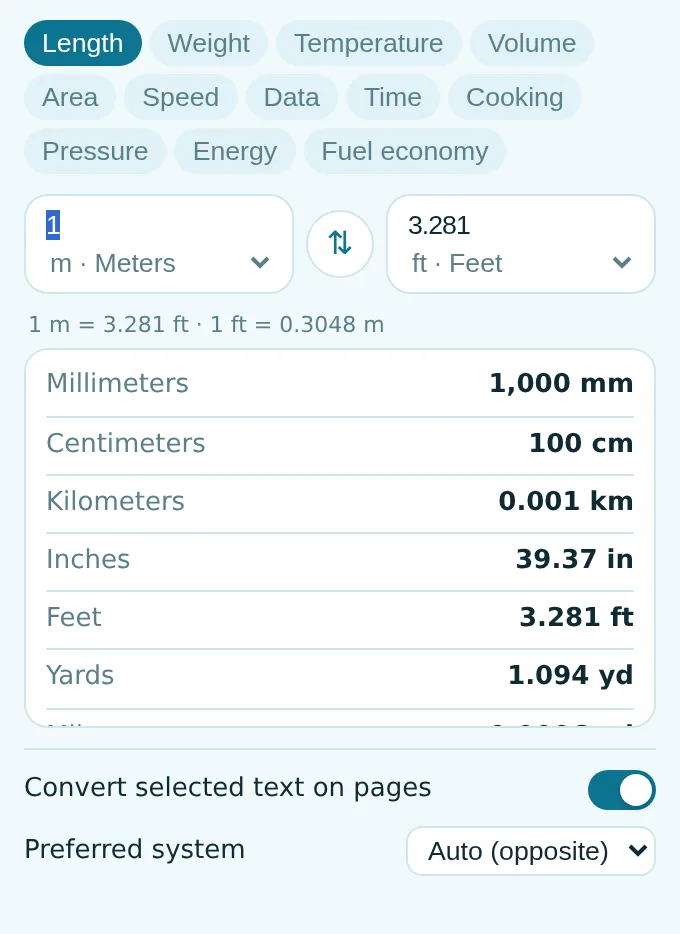
- Type on either side; swap; see the formula and every unit in the category.
- Recent conversions kept locally; works offline.
How to use Unit Converter
- Install — select “2 lbs”, “6 ft 2 in” or “1/2 cup” on any page to see it converted.
- For anything else, click the icon and type a value.
- Click a row in the table to make that unit the target.
When it comes in handy
- Recipes from American sites — cups, ounces and Fahrenheit.
- Shopping abroad: inches, pounds, miles per gallon.
- Checking data sizes, speeds and pressures in technical articles.
Free and Pro
$5.49/month · $35.79/year · $49.99 once, forever
Cancel anytime. Prices are shown in USD; local currencies at checkout.
Questions
Does it understand mixed values?
Yes — “6 ft 2 in”, “1/2 cup” and “1,5 kg” (comma decimal) are all recognised.
Can I change the target unit?
Yes: pick your preferred targets in the options, e.g. always metric or always imperial.
Is Unit Converter free?
Yes — the free tier covers 3 files per installation with every feature. If you need more, Pro removes the limit; one Pro works in all our extensions.
What is Pro?
A single optional subscription ($5.49/month, $35.79/year or $49.99 once) that removes the free limits in every extension of the collection. You only see it when you hit a limit.
Does it collect or send my data?
It works inside the pages you open, in your browser; there is no account and no analytics. The permissions above are the full list.
Does it work in Edge, Brave, Opera?
Yes, any Chromium browser installs extensions from the Chrome Web Store.
More in Tabs & productivity
 Auto ScrollHands-free smooth auto-scrolling for reading, teleprompter and long feeds. Adjustable speed, pause, hotkeys (Alt+Shift+S).
 Bulk URL Opener — Open Multiple URLsBulk URL opener: paste a list of links and open them all as tabs, in a new window or a tab group, with a delay. Saves your lists.
 Clipboard History — Clipboard ManagerClipboard history: everything you copy on the web is saved locally. Search, pin, click to copy again. Nothing leaves your computer.
 Copy All URLs — Copy Tabs & LinksCopy all URLs of open tabs or every link on a page in one click. Plain text, Markdown, HTML or JSON. Paste a list to open all.
 Currency Converter — Prices on Any PageCurrency converter for any price on any page: select a price and see it in your currencies and crypto. 160+ currencies, BTC, ETH.
 Desk Yoga & Stretch Break ReminderGuided 1–3 minute desk stretches for neck, shoulders, back, wrists and eyes, with gentle hourly reminders.
Technical details and permissions
The extension asks only for what the feature needs:
| Permission | Why |
|---|---|
storage | Remember your settings locally. |
identity | |
Site access | The extension needs access to pages to do its job (see the table); it does not send page content anywhere. |
Fast unit conversion where you read, not on a third-party site full of ads.
Popup: 12 categories (length, weight, temperature, volume, area, speed, data, time, cooking, pressure, energy, fuel economy). Type on either side — conversion is instant both ways — swap, see the formula and a table of every unit in the category, click a row to make it the target, recent conversions kept locally.
On every page: select (or double-click) a measurement — 5 miles, 350°F, 2 lbs, 1/2 cup, 6 ft 2 in, 100 km/h, 32 mpg, ranges like 10–15 cm — and a tooltip shows it in the other system with a copy button. The preferred system (auto / metric / imperial) and the tooltip itself can be set in the popup. Recognition is a local regex over the selected text; nothing is sent anywhere.
Permissions: storage (settings, recent), <all_urls> (tooltip on selection).